# Create Lesson Plans

ParentLocker has a lesson plans feature where you can add lesson plans for each week.

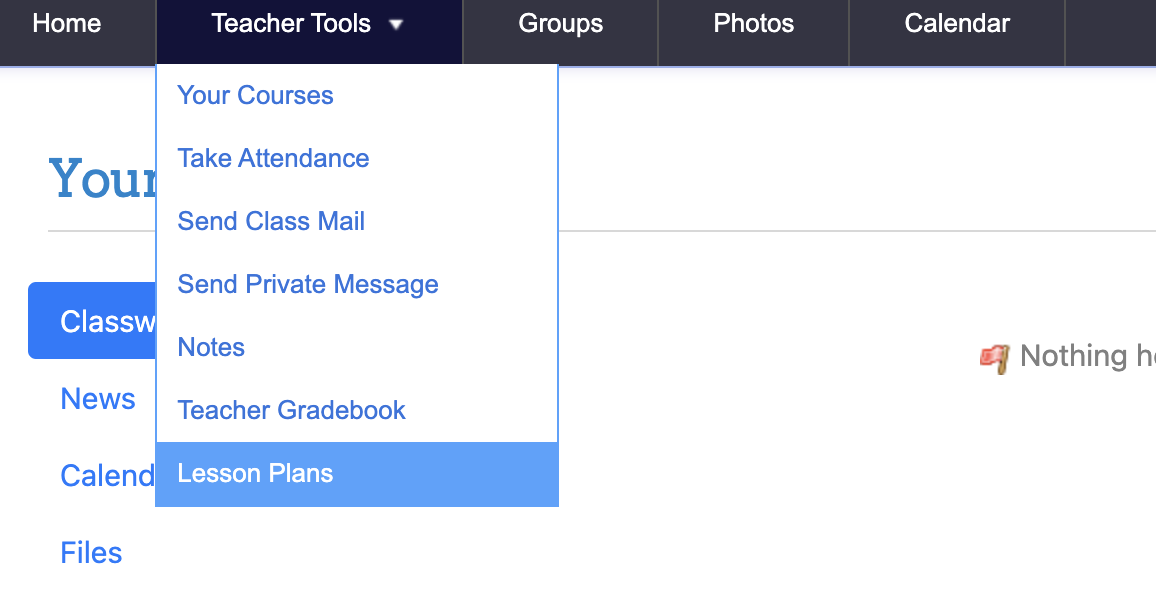
1. From **Teacher Tools**, go to **Lesson Plans**  
    ![Screenshot 2024-07-30 at 9.46.46 AM.png](https://wiki.mdy.org/uploads/images/gallery/2024-07/scaled-1680-/zxr67ZKiHSbifmSb-screenshot-2024-07-30-at-9-46-46-am.png)
2. Plans can be inputted per week, for each day of the week.
3. Files can be **uploaded** to lessons, for example, handouts and worksheets relevant to each day (or an already created lesson plan in Word, Excel, PDF).  
    <span id="bkmrk-" style="font-weight: normal;"><span style="font-size: 11pt; font-family: Arial, sans-serif; color: rgb(0, 0, 0); background-color: transparent; font-weight: 400; font-style: normal; font-variant: normal; white-space-collapse: preserve;"><span style="border-width: initial; border-style: none; display: inline-block; overflow: hidden; width: 624px; height: 391px;">![](https://lh7-rt.googleusercontent.com/docsz/AD_4nXdFaxUjKpzxNH_dQzGy1zK8ykV524NwaUMBbflcvrKnw6dkDWtJE1e4mmSyEMh2qAPAXL3-u0kgDIaJs1Qxcemg01uJplqkucsH3-KHK2G712efL6nWCBDADBIjL39UHxUIXXcDok0tbnkJpvufa4qiszu9?key=UKUf31ggYaT6I5pbXyAEbA)</span></span></span>
4. Click **Save Lessons** when finished.
5. Change the week in the top right corner  
    <span id="bkmrk--1" style="font-weight: normal;"><span style="font-size: 11pt; font-family: Arial, sans-serif; color: rgb(0, 0, 0); background-color: transparent; font-weight: 400; font-style: normal; font-variant: normal; white-space-collapse: preserve;"><span style="border-width: initial; border-style: none; display: inline-block; overflow: hidden; width: 624px; height: 48px;">![](https://lh7-rt.googleusercontent.com/docsz/AD_4nXefn-DneyLcrk12h5gNVOvaO-vSZogdI5s2dxs2XSkxKmqBT8-WVFCzP5p0WuQZm1Tsdorgg7x_NQUzXBSAmhUdfO-x6L-wDMWufbT333KilveM48UFQVAWGYgCPkMuPxP4S0VT_VABBfDIGhzwgyQvOf0?key=UKUf31ggYaT6I5pbXyAEbA)</span></span></span>